Showing posts with label Windows 8. Show all posts

Monday, March 3, 2014

Use WhatsApp on PC

How to Install WhatsApp on PC? Download WhatsApp for PC (Windows)

WhatsApp is the most popular online SmartPhone messaging App. You can easily use this app or you may be currently using this app right now on your SmartPhone. WhatsApp can be used on any Smartphone Including Android, iOS, BlackBerry,Windows Phone and Asha platform, but what if you want to use it in PC? Yes you can install Whatsapp on PC! You can use it on Windows XP, Windows 7, Windows 8 and also in Windows 8.1

Monday, February 24, 2014

The Windows 8.1 OS Activator

Free download the Activator! Use this Activator to activate your Windows 8.1th version Operating System without any problem. This is a KMSAuto Net activator which activates all of your 8.1 versions (including  Pro, Enterprise, RT etc) like a charm. It doesn't install any Scam or other malicious software, it just simply activates your OS without any problem. Following is the link to download that file!!! (The name of the file is "8.1 activator")

Sunday, June 30, 2013

How To Create Wireless Ad Hoc Internet Connection In Windows 8

Following guide will help you making your laptop as a WiFi router!
The procedure outlined here makes use of Windows’ native Network Shell utility, deploying thewlan command within the utility to enable a hosted network that will, in turn, serve as your ad hoc connection. If all this sounds daunting, fret not, for the actual procedure is fairly easy. Follow the steps outlined below, and you should be good to go
It should be noted that for this method to work, your network interface must be capable of supporting hosted networks. It’s always advisable to update your network adapter to the latest drivers before doing this!
Procedure
Step 1: Launch an elevated command prompt under Windows 8 (one with administrator privileges).
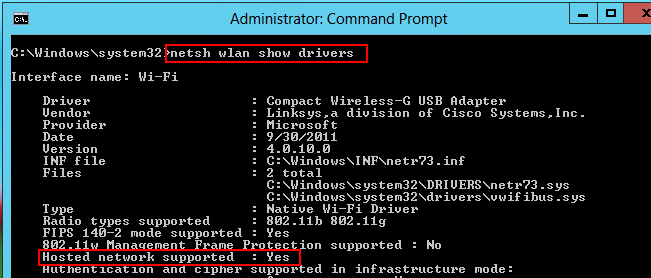
Step 2: Run the following command to verify that your network interface supports virtualization:
netsh wlan show drivers