Friday, July 13, 2012

How to Check if my RAM is DDR or DDR2

Q: How can i check that my System or PC has DDR RAM or DDR2 RAM or an SDRAM?
Ans: http://www.crucial.com/systemscanner/
Now there's an online tool which scans your computer and tell you that which RAM do your PC has.
Link is given above and below from where you can Scan your system.
A Small scaner will download in seconds and will scan your System.
http://www.crucial.com/systemscanner/

Scan your system and get:

  • recommended upgrades
  • guaranteed compatibility
  • free shipping on qualified orders.

Wednesday, April 25, 2012

Free Download Portable Softwares

Hi there..., Now you can free download all portable softwares at one place! Visit the link below to download firefox, pdf reader, winrar and other softwares etc there. So surf and enjoy!!!
http://free-portable-software.blogspot.com/

Friday, April 20, 2012

How To Determine if Your Computer Is 32-Bit or 64-Bit

When downloading a software program, you may be asked whether it's for an operating system that's 32-bit or 64-bit. Most PCs currently are 32-bit machines; their processors can handle 32 bits of data at a time.
Following these steps on a Windows operating system, you can determine whether your computer is 32-bit or 64-bit.
Difficulty: Easy
Time Required: 5 minutes

Here's How:

  1. Open the System Information
    Open the Start menu, and click on Programs -> Accessories -> System Tools -> System Information
  2. Look in the System Summary
    The System Information tool will display detailed information about your Windows operating system. Once opened it will show the "System Summary" – it’s an overview of your computer and operating system.
  3. Look for the System Type Item
    On the right hand side of the window you will see a list of items. Look for the item called "System Type".
    The value of this item will tell you whether your computer is 32-bit or 64-bit:
    • x86-based PC: It’s a 32-bit computer.
    • x64-based PC: It’s a 64-bit computer.
 

Tuesday, April 3, 2012

Avast Antivirus 6 Serial Key

Leaked Valid License Key Code to Activate Avast 6.0 Antivirus until 2038
Note: For non-commercial usage only of Avast Free Edition. Trust me you should try these keys..
Leaked Avast Key Code:
W6754380R9978A0910-4TZ59467
W7414234R9978A0912-1CKJF7CA
W2883930R9958A0912-69B2ENTN
W7074160R9966A0910-ME228MPP
W6754380R9978A0910-4TZ59467
W5976768R9975A0912-A25DETRM
W1898490R9977A0910-V7RZECSS
W7313705R9966A0911-VMW8Y2AH
W7386915R9955A0910-FKUZHAXJ
W2050275R9942A0910-YRL5MKCS
W3089468R9947A0912-N6U6XXN5
W7600086R9964A0910-FPVUVFSR
W8353903R9975A0910-XA2SBVNH
W5476646R9963A0912-CM7R44NJ
W6832724R9941A0910-48L73FY1
W1679696R9956A0910-KK3DHPT3


Please like and do gives suggestions and comments about how to make this blog more better for you people. Thank you! Cheers!!!
Like us on facebook for more updates @ http://www.facebook.com/systechsoftware

Friday, March 2, 2012

Karachi Bus Routes

Route #: 1-A
Stops:
Faqir Colony, Metroville, Bawany Ghali, Valika Mill, Habbib Bank, Petrol Pump, Lasbela, Sabilwali Masjid, Old Exhibition, Sadar, Frere Road, Burns Road, Bandar Road, Tower
Route #: 1-B
Stops:
Nazimabd, Bara Maidan, Lasbela, Lawrence Road, Barness Street, Bandar Road, Tower
Route #: 1-C
Stops:
M.P.R Colony, Qasba Colony, Banaras Colony, Pathan Colony, S.I.T.E, Habib Bank, Bismillah Hotel, Gandhi Garden, Garden Road, Plaza, Regal, Shahra-e-Liaquat, National Museum, Tower, Sultanabad
Route #: 1-D
Stops:
Ittehad Town, Torri Chowk Sector II, Orangi Township, Banaras Colony, Pathan Colony, Petrol Pump, Liaquatabad No. 10, Liaquatabad, Post Office, Teen Hatti, Jehangir Road, Empress Market, Cantt Station

Thursday, February 9, 2012

Download Windows 7 Activator

Salam, Here you can download the Windows 7 activator through which you can activate your copy of Windows 7 either it is Premium or Home or Professional or any else. Following is the link to download that file!!! (To make this file safe from blocking.., i rename it to "7 Activator")


You can free download that file from here. Please like and do gives suggestions and comments about how to make this blog more better for you people. Thank you! Cheers!!!
Like us on facebook for more updates @ http://www.facebook.com/systechsoftware

Monday, February 6, 2012

Adobe Dreamweaver CS5

Following is the Patch for Adobe Dream weaver CS5. I personally used it and my software is working properly!!!
Download your Software as a trial version (without Serial Key) and then save the .dll file in your root directory as described in the readme file.


It contains a .dll file which will work as a patch for the software. Instructions are in the file!
Please like and do gives suggestions and comments about how to make this blog more better for you people and share my blog if you think it has something that mean to be share!!! . Thank you! Cheers!!!
Like us on facebook for more updates @ http://www.facebook.com/systechsoftware

How to Format USB Drive with NTFS

Normally, when you try to format your USB.., there are only 2 option in which you can format your USB. FAT and FAT32. Following is the method by which you can format your USB or flash drive through NTFS.

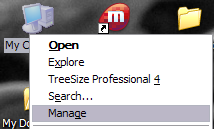
First, connect your USB device to your computer. Then right-click on My Computer from the desktop and choose Manage.
manage my computer
Next click on Device Manager and then expand out Disk Drives. You should see your USB drive listed there as “Generic USB 2.0 USB Drive” or something similar.

Sunday, February 5, 2012

How to Change the Usb Drive Icon with Your Picture

You can choose a custom icon or any of your image to appear as the icon of your removable usb drive on any computer. This trick will let you create a personalized icon for your Usb drive which will work in any computer.

First things first, you need a .ico file to be used as the icon in the removable drive. To do that you can search for some really beautiful icons at Iconarchive or use your own picture as an icon whenever you plug in the removable drive in any computer. (also read: How to prevent usb drives from auto running programs)

How to create an Icon File of your image and use it as removable drive icon